Trying to uncloud an Ecovacs mower
The O500: root access, TLS interception, and the unfinished local protocol
Philipp A. Baer
Computer scientist · DevSecOps engineer · roboticist
Research: PhD at Kassel; distributed systems and cooperative robotics.Robotics: RoboCup (Ulm / Kassel); research group lead at DFKI.GE HealthCare, since 2012: Software, infrastructure, and DevSecOps.Since 1 October 2026: GEHC Product Security, assessment automation and security architecture.
npw.net · git.baer.one/phbaer
Keep this to a short introduction. Bio sources: https://npw.net/ and https://npw.net/cv. The move to GEHC Product Security on 1 October 2026 and its focus on assessment automation and security architecture were supplied by Philipp directly. The personal motivation is to keep everyday devices useful without depending on a vendor cloud.
At home, before the mower
Home Assistant is the control center.
Video
Frigate
DIY devices
ESPHome
Sensors and devices
Zigbee, plus a little Matter
That is the setup I wanted the mower to fit into.
This is the user’s current home setup, not a claim that every device is already independent of cloud services. Keep it brief and move straight to the mower.
The target: an Ecovacs O500 Panorama
What would it take to make an owner-controlled mower work without Ecovacs services?
First target: start, stop, and status.Not yet: camera streaming. It has a separate Kinesis / STUN / ICE path.
IMAGE SLOT · Ecovacs O500 Panorama in the yard; landscape photo
Set the scope and the honest success criterion. “Block the internet and see what breaks” is not the experiment. A useful local setup must command the mower and receive state without the vendor service. Video is separate and out of scope for this pass.
Step 1 — follow the packets
Router capture. One action at a time: DNS, TLS names, timing, flow direction.
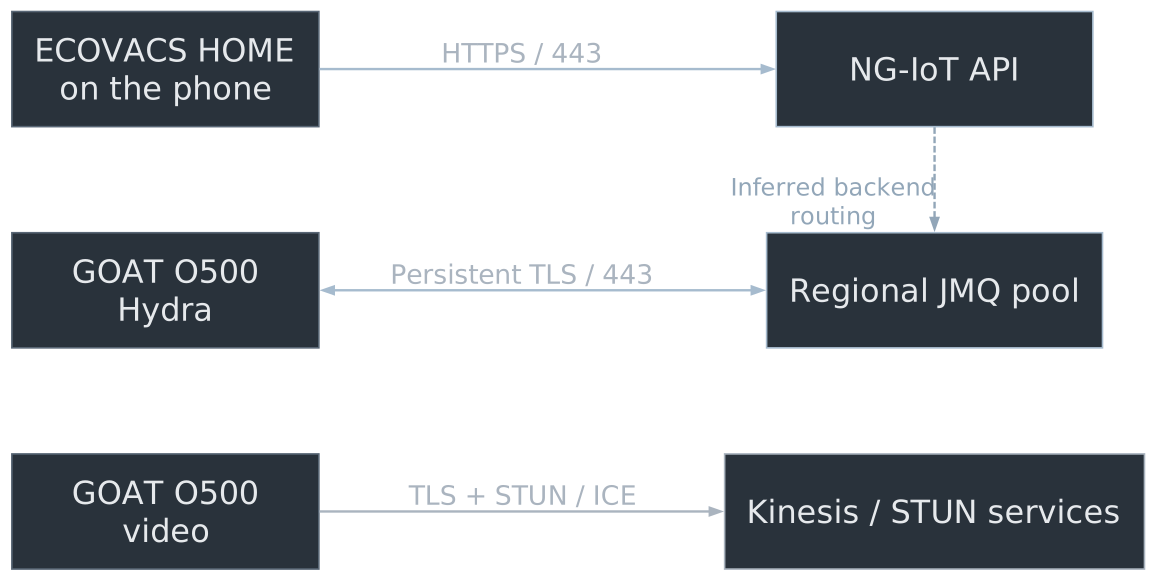
Solid lines: observed connections. Dashed link: inferred backend routing.
Passive captures showed separate app-control, mower-command/status, and video paths. The working model is app → NG-IoT API → Ecovacs backend → JMQ → Hydra on the mower. The API-to-JMQ handoff is inferred: we have not correlated a specific API request with a JMQ message or established the command topics and payloads. The return path for status is also unresolved. The mower’s JMQ connection was long-lived TLS/443 with no ALPN. No ALPN fit MQTT over TLS, but that packet capture alone did not prove MQTT. We used the gateway first to decide where a focused test might help.
The first useful map
Regional JMQ pool
Long-lived TLS/443
Mower command and status
NG-IoT API
HTTPS/443
App control
Kinesis + STUN/ICE
TLS + UDP
Camera/video
Three paths. The app and mower both depend on the cloud for ordinary control.
Keep observation and interpretation separate. “JMQ” and the later MQTT observation are supported by separate pieces of evidence. The video path stays out of scope. This was enough to see that swapping in a local broker alone would not make the stock app local.
How I looked inside the app
Rooted Android · ECOVACS HOME 3.14.0 · Frida
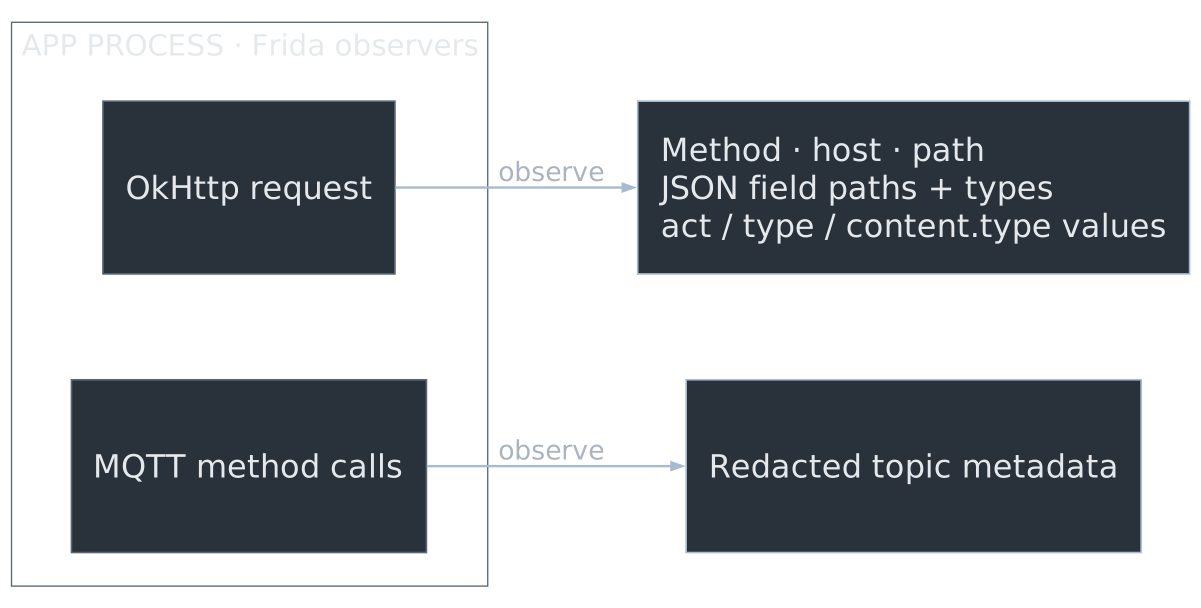
Frida reads app objects before transport encryption .
The owner-authorized Android phone was rooted so Frida could attach to ECOVACS HOME 3.14.0. The HTTP observers hooked OkHttp when the app created a request and, for header-name checks, at CallServerInterceptor. They inspected the request object before it went over HTTPS. Separate observers emitted only JSON paths and primitive types, or the specifically allowed action selectors act/type/content.type. MQTT method hooks emitted redacted topic metadata. The observers omitted credentials, identifiers, full request/response bodies, and full topic strings. Be precise: we instrumented the app process; we did not decrypt a network capture or sit between phone and cloud.
Step 2 — ask the app what “start” looks like
A request shape, not a working recipe. Most fields, authentication, and responses are still unknown.
Other observed body.data keys: name, schedAct, sid, subsets, using (values withheld).
These selectors came from an authorized metadata-only observation of ECOVACS HOME 3.14.0. We also saw field paths and protocol constants, not account values or response bodies. No ordinary HTTP bearer header showed up, but that does not rule out body-level signatures or authentication.
Side quest — is there a local control port?
A focused TCP scan found only port 53 : Unbound DNS.
It answered recursive public-name queries over UDP and TCP. We found no security vulnerability in this check, and no mower-local HTTP control API.
The owner-authorized focused scan found only TCP/53 exposed, fingerprinted as Unbound DNS. It answered recursive public-name queries over both UDP and TCP. CHAOS version.bind and id.server queries timed out. No exploit payloads were sent. This did not surface an operational local mower API.
Step 3 — find the console
A ten-pin service connector exposed two UARTs. The Baize controller TX gave boot diagnostics; the main console showed:
Pin 2 = main-console TX · Pin 3 = ground · Pin 4 = main-console RXHobot>.
IMAGE SLOT · Close-up of the 10-pin service connector; annotate TX, RX, and ground
The receive-only capture exposed the boot chain. The separate G1 Baize line reported controller firmware V0.3.12 but was not a login console. The main console pinout is confirmed; autoboot stopped at the U-Boot prompt.
Inside the firmware
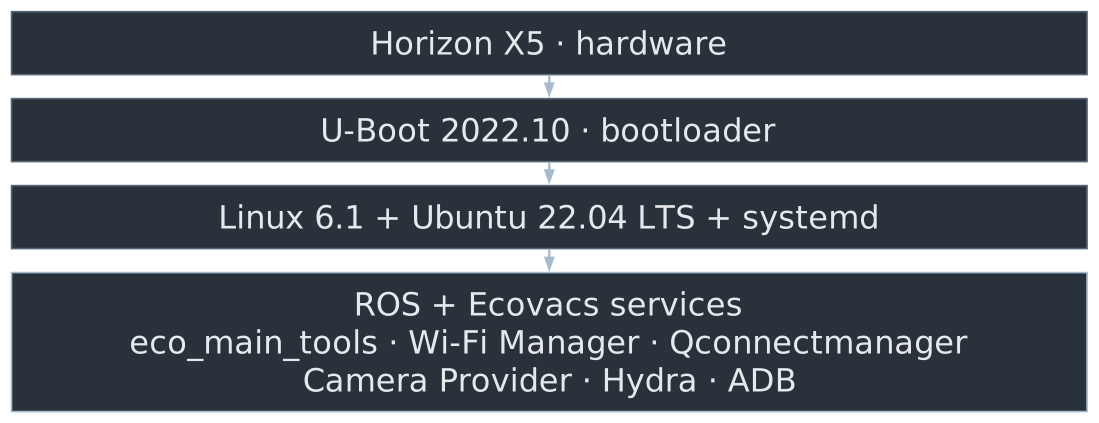
Verified system_a is read-only; /data is separate writable userdata.
These are platform and service names from the boot capture and read-only inspection, not a complete package inventory of the firmware image. The system reports Ubuntu 22.04 LTS, Linux 6.1, and systemd on the Horizon X5. The boot log names ROS and vendor services including eco_main_tools, Wi-Fi Manager, Qconnectmanager, Camera Provider, and ADB; Hydra was confirmed as a running process. The normal root is dm-verity protected and read-only; userdata is mounted separately at /data.
UART bytes without command execution
At Hobot>, the raw monitor records TX and RX separately, with no local echo.
No U-Boot response. CR, LF and version at 100 ms per byte did not restore execution.
Matching RX bytes establish receipt at the adapter. Their source remains unresolved.
The 2026-09-27 raw PySerial tests used 115200 8N1 without flow control. Individual characters, CR, LF, CRLF, a combined help + CR and a bounded invalid command returned matching bytes on adapter RX without command output. The paced version test also failed. These software captures do not locate the echo source. Disconnecting either robot data line reportedly removed the echo, which supports dependence on both connections but does not establish the internal path. Backspace and Delete probes returned exact bytes without a CLI erase sequence. RX timestamps record display of queued bytes, not electrical arrival. Source: ../docs/O500_Research.md, Raw UART echo test, Bounded U-Boot prompt test, and Line-editing probe and disconnect controls.
Another door: USB ADB
The USB-A receptacle enumerated as an ADB gadget.
No shell. No filesystem commands sent.
We first observed the gadget in boot logs, then confirmed the external connector enumerated as ADB. The host reported unauthorized. ADB needs device-side key approval, and we had no working route to approve it. Make clear no shell or filesystem commands were sent over ADB.
The temporary U-Boot experiment (RAM only)
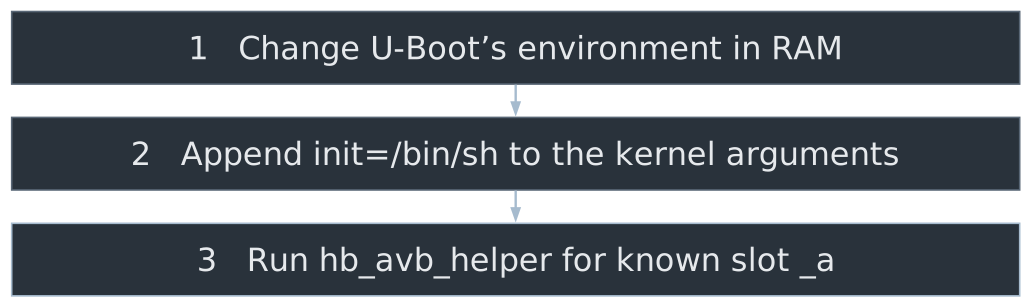
This was not a replacement bootloader and nothing was flashed.
I skipped eco_ab_select, which records boot attempts in A/B metadata.
Explain the mechanics simply. U-Boot is already on the device and runs before Linux. At its prompt, a one-time RAM environment change replaced updatebootargs with a wrapper that appended init=/bin/sh. Then hb_avb_helper was invoked for the known _a slot directly, without eco_ab_select (which writes A/B boot-attempt metadata). The experiment did not modify U-Boot or the verified system on flash. The temporary environment disappears on power-cycle.
What the temporary boot got us: no shell
The device echoed id and Ctrl-C, but returned no prompt or command output.
The separate recovery configuration also gave no UART output, USB device, or normal LAN address.
It was inconclusive—not a root shell. Power-cycle restored normal boot.
These runtime experiments did not provide maintenance access. Echoed input is not proof that init=/bin/sh ran successfully. We saw no shell prompt or command output, and made no observed persistent change.
The filesystem explained the missing login
The boot log: serial-getty@ttyS0 started, then stopped. No login prompt.
On system_a, serial-getty@.service calls /usr/bin/serial_tty.sh:
if [[ $1 != "ttyS0" || -f /data/serial_to_be_run ]]; then /sbin/agetty ... " $1 " " $2 " fi The marker enables agetty but supplies no credentials. I left it absent.
Root came from a separate hook: /data/autostart/*.sh, launched after ROS.
Explain the discovery chain: the boot log showed serial-getty@ttyS0 repeatedly starting and stopping without a login prompt. Read-only inspection of system_a showed serial-getty@.service invokes /usr/bin/serial_tty.sh. That wrapper checks whether the device is ttyS0 and whether /data/serial_to_be_run exists; unless the marker exists, it skips agetty, then exits. This exactly explains the logs. We did not create the marker: it would only make a login prompt appear and would not supply valid credentials or root. The working root shell used the separate /data/autostart mechanism, which runs as root after ROS. system_a stayed dm-verity protected and read-only; /data is separate writable userdata.
How we installed the root shell
U-Boot’s USB Mass Storage (UMS) mode exported eMMC userdata as a USB disk. Controller 1 was the working path:
This was USB storage access—not the separate ADB interface.
UMS is U-Boot’s USB mass-storage gadget mode: it exports a selected block device to the attached host. Controller 0 did not enumerate; controller 1 worked. mmc 0:10 selects eMMC GPT partition 16—U-Boot interprets the partition number as hexadecimal. The host saw the ext4 userdata partition as /dev/sda. The reviewed script was copied into the autostart directory and made executable. This changed writable userdata, not the dm-verity-protected system partition. This is different from the USB ADB gadget discussed earlier.
Why the first boot was silent — and the fix
After ROS starts, autostart.service runs /data/autostart/*.sh as root .
The first script got no UART response. The stock getty was competing for ttyS0.
The working script stopped the getty, set the UART to 115200, then exec’d interactive Bash on /dev/ttyS0.
This is the mechanism that actually gave us root—not the failed init=/bin/sh attempt. The first installation was silent. The revised script checks its start argument, sets PATH and the GOAT# prompt, stops serial-getty@ttyS0.service, runs stty -F /dev/ttyS0 115200 sane, then execs /bin/bash –noprofile –norc -i with stdin/stdout/stderr on ttyS0. Because autostart.service has no User= override, the script runs as root.
And then it worked
On a normal boot, the UART showed:
Interactive root Bash worked over the console. The hook opens no network service .
This was confirmed after normal boot: GOAT# appeared, id returned uid=0(root), and serial-getty@ttyS0.service was inactive. The script remains installed on userdata at /data/autostart/10-serial-root.sh. The verified root filesystem remained read-only.
Maintenance access is blocked
After the reported RX-pin accident, normal boot still reaches GOAT#.
id returns matching RX bytes, but no output or fresh prompt.
The bootstrap remains installed. UART cannot currently remove it, UMS cannot be started, and USB ADB remains unauthorized.
Historical interactive root access remains confirmed. Current raw tests from 2026-09-27 do not establish command execution. The installed script uses stty sane, which enables canonical input, CR-to-LF mapping and TTY echo. Linux line-discipline echo may therefore explain the returned characters without Bash consuming the command. Bash reports no controlling terminal and no job control, but that warning alone does not explain why id fails. The later capture explicitly stopped serial-getty, so that service was not the competing reader in that run. The reported handling accident is historical context, not an electrically verified explanation for all matching RX bytes. Logs remain outside version control. Source: ../docs/O500_Research.md, Normal-boot shell input test and Current hand-off state.
The next UART check
Probe X5 TX and RX independently with a 3.3 V logic analyzer or oscilloscope.
Establish the adapter’s intentional loopback signature, then remove the jumper.
Disconnect adapter TX from mower RX and check for host-side loopback.
Reconnect and verify delivery on pin 4 and output on pin 2 independently.
A no-echo Bash diagnostic is staged, not installed . Deployment requires a verified /data backup and tested rollback.
Keep common ground and separate supply rails. Physical waveforms locate the byte path but still do not prove interpreter acceptance. The staged goat_serial_bootstrap_diag.sh disables Linux TTY echo and Bash line editing so a visible response such as id can distinguish command output from echo. Do not deploy it before a verified backup and tested rollback. uart_raw_diag.py sends nothing automatically and supports bounded paced TX plus separate timestamped RX/TX logs. Source: ../docs/O500_Research.md, UART echo-source verification plan, and ../DEVELOPMENT.md, Horizon X5 UART diagnostics.
Step 4 — get Hydra talking locally
Hydra is the mower process that connects to JMQ. Its mqCa setting points to a writable trust file:
With our test CA first in that file and JMQ traffic redirected to a local listener, Hydra completed TLS 1.3 .
We restored the original trust file and removed the redirect. The mower reconnected to Ecovacs.
Hydra runs as /usr/bin/hydra -c /data/tiot/hydra/conf/hydra.json. It handles the mower-side JMQ connection; the app-facing NG-IoT HTTPS API is separate. Its configuration names mqCa at /data/certs/master.pem but contains no MQTT client-certificate or private-key path.
Keep intermediate troubleshooting available for questions: the initial self-signed server certificate was rejected with bad_certificate. This established server-certificate validation, not certificate pinning. The first CA append failed OpenSSL validation because the stock PEM had no trailing newline; this happened before any redirect. The original file was restored through UMS and its checksum matched. A valid bundle with the vendor CA first still failed with unknown authority. The same two certificates with the test CA first worked, showing that Hydra effectively used the first certificate in the bundle.
The successful test used the expected JMQ SNI and a source-restricted redirect. Afterward, the original CA was restored byte-for-byte and the redirect removed. Hydra reported MCStatus: OnConnect against the normal Ecovacs endpoint. The local listener did not request a mower client certificate; this result establishes server trust and a completed TLS connection, not normal device authentication or working local commands.
MQTT was visible; local control is still open
A separate MQTT probe observed:
MQTT 3.1.1 CONNECT framing
A clean session and 60-second keepalive
Four QoS-1 subscriptions
We still need accepted device authentication, command topics, and working status updates .
The TLS listener did not request a client certificate. The normal JMQ service does; that identity path remains unresolved.
The metadata-only MQTT harness was a separate run, not application data exchanged during the preceding TLS test. It observed CONNECT framing and subscription metadata, but did not demonstrate accepted authentication or a local command/status loop. Credentials, identifiers, full topic strings, and payloads were withheld.
A separate handshake with the live JMQ service returned a TLS CertificateRequest listing ECOVACS Cloud Account Root as an acceptable client CA. The local TLS listener did not request a client certificate, so its successful handshake did not reproduce or resolve the normal client-identity path. The app-to-JMQ handoff and status return path are also still unconfirmed.
What worked—and what is still missing
We know
Root shell confirmed earlier
We don’t know
Accepted auth
That gap is the project right now.
Summarize the real progress without dressing it up as completion. Local transport and framing are milestones. Accepted auth, topic semantics, command responses, registration, and app status remain open. Camera streaming is still separate.
What I’d try next
Isolate the UART echo source and restore reliable maintenance input.
Map one safe command and the matching status update.
Build the JMQ and app-facing pieces needed for that loop.
Test with cloud access absent on an isolated network.
No “unclouded” claim until start, stop, and status work locally.
This is a practical next experiment, not a roadmap promise. The immediate blocker is dependable maintenance access. Android instrumentation stays secondary and should answer a specific protocol question. Don’t block cloud access on the operational network before the local replacement works in isolation.
The projects are public
The freely available projects are at git.baer.one/phbaer
Browse, reuse, fork, improve.
IMAGE SLOT · Project-list screenshot or QR code linking to the repo collection
Point attendees to the public project collection. One discoverable repository is npw.net, a VitePress-based site. Do not imply that every hosted project directly supports the home stack or the O500.
Questions
What would you try next—and what result would change your mind?
Keep the discussion informal. Invite people to challenge the interpretation of the TLS result, suggest the next low-risk probe, or share their own “it echoed, but didn’t execute” moments.